Developer Guide
This guide provides information on the structure of the jz-tree repository, on the handling of lower-level CUDA modules and on the unit-testing system. It is recommended that you read this if you want to modify the code yourself.
Code structure
If you execute tree -L 2 from the main directory, you will see something like the following
├── CMakeLists.txt
├── ...
├── build
│   ├── ...
├── checks
│   ├── benchmarks
│   ├── ...
│   ├── hello_world.py
│   ├── ...
│   └── tests
├── docs
│   ├── ...
├── notebooks
│   ├── multi_gpu_guide.ipynb
│   ├── quickstart.ipynb
├── pyproject.toml
├── src
│   ├── jztree
│   ├── jztree_cuda
│   └── jztree_utils
└── ...
CMakeLists.txtand thepyproject.tomldefine how the CUDA code gets compiled.checksis a directory that contains unit-tests, benchmarks and some other scripts used to evaluate the codedocscontains the files needed to build this documentation – generated with Sphinx.notebookscontains some Jupyter notebooks that explain usage of the repo.buildcontains files that are created when building the project.srccontains three separate directories:jztree: the main Python module
jztree_cuda: the CUDA/FFI kernels
jztree_utils: Some data and tools that help with testing the code.
Python modules
The src/jztree directory has the following structure:
src
├── jztree
│   ├── __init__.py
│   ├── _version.py
│   ├── comm.py
│   ├── config.py
│   ├── data.py
│   ├── fof.py
│   ├── jax_ext.py
│   ├── knn.py
│   ├── stats.py
│   ├── tools.py
│   └── tree.py
You can find some of the Python modules documented in the API reference. However, there are additional files that deal with lower-level details that are not included:
comm.py: Holds some communication helper functions with more convenient interfaces than JAX’s built-in methodsconfig.py: Holds configuration dataclasses that are used throughout the code to control lower-level detailsdata.py: Holds dataclasses (such as particles) and some convenience functions to access / manipulate them.fof.py: The implementation of the friends-of-friends clustering.jax_ext.py: Holds a few functions that extend some standard JAX functions with additional features.knn.py: The implementation of the k-nearest neighbour search.stats.py: Defines a context manager that may be used to infer, e.g. how much of the allocated spaces were used.tools.py: Some frequently used helper functions.tree.py: Defines z-sorting, tree-building and regularization.
CUDA kernels and automatic FFI generation
The src/jztree_cuda directory has the following structure:
src
├── jztree_cuda
│   ├── _generate_ffi.py
│   ├── common
│   │   ├── data.cuh
│   │   ├── iterators.cuh
│   │   └── math.cuh
│   ├── fof.cuh
│   ├── generated
│   │   ├── ffi_fof.cu
│   │   ├── ffi_knn.cu
│   │   ├── ffi_sort.cu
│   │   ├── ffi_tools.cu
│   │   └── ffi_tree.cu
│   ├── knn.cuh
│   ├── sort.cuh
│   ├── tools.cuh
│   └── tree.cuh
Importantly, the directory generated contains foreign function interface (FFI) bindings that
are automatically generated. So I suggest not modifying these files manually.
Let us have a look at an example to see how this works. In the file tree.cuh you can find a
kernel with the following signature:
template<int dim, typename tvec>
__global__ void GetNodeGeometry(
    const Vec<dim,tvec>* pos,
    const int* lbound,
    const int* rbound,
    const int *nnodes,
    int32_t* level,
    Vec<dim,tvec>* center,
    Vec<dim,tvec>* extent,
    const int size_nodes,
    const int size_part,
    const int lvl_invalid,
    const uint32_t mode_flags,
    const bool upper_extent
) {
    //...
}
This kernel computes properties of nodes, given knowledge of their first and last particle (indicated
by lbound and rbound). All input arrays (pos, lbound, rbound, nnodes)
are pointers with the const keyword, whereas output arrays (level, center and extent) are
pointers without const. Static parameters are const, but not pointers. Finally, there
are template parameters dim and tvec – indicating the dimension and the data type of vector
data types (e.g. float or double).
Ideally, we’d want to call this kernel directly from Python/JAX, but this is not possible. Instead
we need to interface with JAX’s FFI – which involves a lot of boilerplate code. This gets especially
challenging with the requirement that we need to instantiate all the template parameter combinations.
Therefore, I have written a little tool jax_ffi_gen that
auto-generates the FFI from the function signature. Let’s have a look at the file
jztree_cuda/_generate_ffi.py:
from jax_ffi_gen import parse, generator as gen
# ...
functions = parse.get_functions_from_file(
    str(HERE / "tree.cuh"),
    names=["FlagLeafBoundaries", "FindNodeBoundaries", "GetNodeGeometry", "CenterOfMass",
           "GetBoundaryExtendPerLevel", "FlagInteractingNodes"],
    only_kernels=False
)

# ...

add_dim_dtype_templates(functions["GetNodeGeometry"], "pos")
functions["GetNodeGeometry"].par["size_nodes"].expression = "lbound.element_count()"
functions["GetNodeGeometry"].par["size_part"].expression = "pos.dimensions()[0]"
functions["GetNodeGeometry"].grid_size_expression = "div_ceil(size_nodes, block_size)"

# ...

gen.generate_ffi_module_file(
    output_file = str(HERE / "generated/ffi_tree.cu"),
    functions = functions,
    includes = default_includes + ["../tree.cuh"]
)
You can see that the code-generation involves three steps:
(1): We find all the functions of interest by parsing the code of tree.cuh (this internally uses
tree-sitter).
(2): We customize some aspects of the function. For example, we can infer the parameter “size_nodes”
from the element count of one of JAX’s arrays. Further, we need to define template instances. To
avoid repetition, it is done with the add_dim_dtype_templates function – which does
something like this
functions["GetNodeGeometry"].template_par["dim"].instances = (2,3,4,5,6,7,8,9,10)
functions["GetNodeGeometry"].template_par["dim"].expression = "pos.dimensions()[1]"
Further, we define a “grid_size_expression” which defines the kernel launch. (If you skip this, you may also define the “grid_size” parameter directly from the Python side.)
(3): We call gen.generate_ffi_module_file to auto-generate the FFI code. E.g. if you delete
generated/ffi_tree.cu and run the script, it should reappear. This generation step uses a
Jinja template setup internally.
If you have a look at the generated file, you will find something like this
ffi::Error GetNodeGeometryFFIHost(
    cudaStream_t stream,
    ffi::AnyBuffer pos,
    ffi::AnyBuffer lbound,
    ffi::AnyBuffer rbound,
    ffi::AnyBuffer nnodes,
    ffi::Result<ffi::AnyBuffer> level,
    ffi::Result<ffi::AnyBuffer> center,
    ffi::Result<ffi::AnyBuffer> extent,
    int lvl_invalid,
    uint32_t mode_flags,
    bool upper_extent,
    size_t block_size
) {
    // ...
    // a lot of code for instancing all template parameter combinations
    // ...

    cudaLaunchKernel(
        instance,
        gridDim,
        blockDim,
        args,
        smem,
        stream
    );

    // ...
}

XLA_FFI_DEFINE_HANDLER_SYMBOL(
    GetNodeGeometryFFI, GetNodeGeometryFFIHost,
    ffi::Ffi::Bind()
        .Ctx<ffi::PlatformStream<cudaStream_t>>()
        .Arg<ffi::AnyBuffer>() // pos
        .Arg<ffi::AnyBuffer>() // lbound
        .Arg<ffi::AnyBuffer>() // rbound
        .Arg<ffi::AnyBuffer>() // nnodes
        .Ret<ffi::AnyBuffer>() // level
        .Ret<ffi::AnyBuffer>() // center
        .Ret<ffi::AnyBuffer>() // extent
        .Attr<int>("lvl_invalid")
        .Attr<uint32_t>("mode_flags")
        .Attr<bool>("upper_extent")
        .Attr<size_t>("block_size"),
    {xla::ffi::Traits::kCmdBufferCompatible}
);

// ...

NB_MODULE(ffi_tree, m) {
    // ...
    m.def("GetNodeGeometry", []() { return EncapsulateFfiCall(&GetNodeGeometryFFI); });
    // ...
}
Feel free to have a look at the full source-code to appreciate the amount of coding work that we are saving with this. (And more importantly the amount of interfacing bugs that we avoid!)
Finally, let us see how we call this function from the Python side.
#...
from jztree_cuda import ffi_tree, ffi_sort
#...

jax.ffi.register_ffi_target("GetNodeGeometry", ffi_tree.GetNodeGeometry(), platform="CUDA")

#...
def get_node_geometry(posz: jax.Array, lbound: jax.Array, rbound: jax.Array,
                      num: jax.Array | None = None, block_size: int = 64,
                      result: str = "lvl_cent_ext", upper_extent: bool = False
                      ) -> Tuple[jax.Array, jax.Array, jax.Array]:

    # define mode_flags ...

    if num is None:
        num = jnp.array(len(lbound))

    size = lbound.shape[0]

    out_types = (
        jax.ShapeDtypeStruct((size,), jnp.int32),
        jax.ShapeDtypeStruct((size, posz.shape[-1]), posz.dtype),
        jax.ShapeDtypeStruct((size, posz.shape[-1]), posz.dtype)
    )

    lvl, cent, ext = jax.ffi.ffi_call("GetNodeGeometry", out_types)(
        posz, lbound, rbound, num, block_size=np.uint64(block_size),
        lvl_invalid=np.int32(-2000), mode_flags=np.uint32(mode_flags), upper_extent=upper_extent
    )

    # ...
(I have simplified this function a bit.) If you compare with the signature of the CUDA kernel,
you see that the interface is mostly identical: for every const *, we have one input array;
for every *, we have one output array; and for every parameter (except the ones that we hard-coded),
we pass a keyword argument with the same name. The only additional parameter is block_size which
defines how many threads are dispatched per block and it is generally considered an important
performance parameter to test (good choices are generally multiples of 32 or 64, depending on the kernel).
So the auto-generation allows us to work “almost” as if we were directly invoking the kernel from JAX. It’s understandable if this whole setup feels a bit overwhelming, but it gets easier after trying it out a bit. And it is well worth it if you consider that it allows you to compute at the fastest possible speed. I have set up a minimal setup in this repository if you’d like to play around within a safe testing ground.
Unit tests and benchmarks
jz-tree is a well-tested and benchmarked codebase. If you check tree -L 2 from checks,
you find the following structure:
├── ...
├── benchmarks
│   ├── .results
│   ├── bench_comm.py
│   ├── bench_distr_fof.py
│   ├── bench_distr_knn.py
│   ├── bench_distr_tree.py
│   ├── bench_fof.py
│   ├── bench_knn.py
│   ├── bench_ops.py
│   └── bench_tree.py
├── conftest.py
├── data
│   ...
├── ...
├── profiling
│   ├── ...
├── pytest.ini
└── tests
    ├── test_distr_fof.py
    ├── test_distr_knn.py
    ├── test_distr_tree.py
    ├── test_fof.py
    ├── test_knn.py
    └── test_tree.py
The directory tests contains a couple of unit tests and the benchmarks directory contains
benchmarks – all of which can be run with pytest. Tests and benchmarks that contain distr
are testing multi-GPU scenarios and should be run with multiple devices available.
If you want to be able to run all of these, you need to install additional requirements:
pytest
pytest-jax-bench – this is a little pytest plugin that I have created to simplify defining repeatable benchmarks for jax programs. It writes benchmark results into
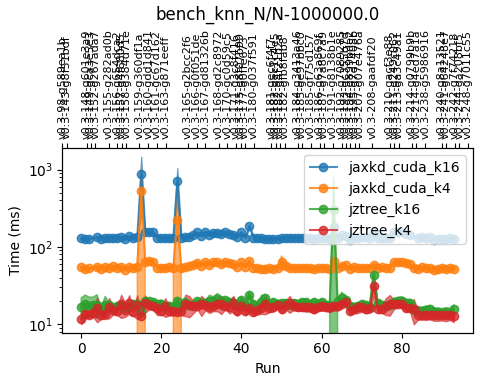
benchmarks/.resultsand also creates plots that allow to track the performance of different functions across commits. For example, the following is the performance history ofbench_knn.py::bench_knn_N[1e6]on my laptop. A large part of the variations comes from connecting a larger or smaller number of displays to my laptop, but you can believe me that I’d have noticed it if I ever made the code slower!
hfof – required in a single test that will be skipped if you don’t have it.
DISCO-DJ – used in some tests on cosmological simulations. If you don’t have it, the corresponding tests will be skipped. Note that the private and public interface of this code have slightly diverged and you may not be able to run tests with this until the most recent changes become public.
Try running some of the tests, e.g. from the checks directory:
pytest --quick tests/test_knn.py
or
pytest --quick benchmarks/bench_tree.py
The latter gives output like this:
Using single-host mode
======================================================== test session starts ========================================================
platform linux -- Python 3.12.11, pytest-8.4.2, pluggy-1.6.0
rootdir: /home/jens/repos/jz-tree/checks
configfile: pytest.ini
plugins: jax-bench-0.5.0, forked-1.6.0, regressions-2.8.3, datadir-1.8.0, anyio-4.11.0, jaxtyping-0.3.3
collected 7 items

benchmarks/bench_tree.py s.sss.s

================================================ Pytest Jax Benchmark (PTJB) results ================================================
                             Test                               C.Run       Tag        Compile(ms)      Jit-Run(ms)    Jit-Peak(MB)
benchmarks/bench_tree.py::bench_build_tree_hierarchy[1048576]  0->4   geom_centered  1191.8->1233.8  2.1->1.4+-1.1    18.8->18.8
benchmarks/bench_tree.py::bench_build_tree_hierarchy[1048576]  0->4   mass_centered  1109.6->1052.3  3.1->2.6+-0.6    20->20
benchmarks/bench_tree.py::bench_zsort[8388608]                 0->4   zsort          166.0->156.8    22.1->21.2+-1.7  264->264
All PTJB benchmarks plots saved to benchmarks/.results
=================================================== 2 passed, 5 skipped in 6.70s ====================================================
The --quick option skips a lot of tests/benchmarks that are slightly redundant (i.e. they address
the same question, but with different parameters). Of course, you can omit it if you want to have a
full picture!
Recommendations
So far jz-tree only contains the implementation of two algorithms, nearest neighbour search and friends-of-friends. However, in principle the framework may be applied to a large class of other algorithms that use dual treewalks. If you are interested in implementing another algorithm, I’d recommend the following steps:
First define a leaf-leaf interaction kernel. This one should be close to a brute-force approach, but where the input data is grouped into leaves.
Try to follow the same traversal pattern that is used in
knn.cuhandfof.cuh. This will give you a well-coalescing memory access pattern which is very important for performance on GPU.You can create a simple setup by seeding a dense interaction list on the leaves (i.e. every leaf interacting with every other leaf) and evaluating your kernel.
Set up some unit tests for it and make sure it gives correct results.
Set up some benchmarks for small problems (with ~ 1e5 particles) this should already give you decent performance, but it probably doesn’t scale well to large problem sizes.
Next, define a node-node interaction kernel. Here, you have to consider the following questions:
Do you need to pre-calculate some additional information for your nodes?
Under which conditions can you discard interactions (prune)?
What data can you evaluate at the parent level and pass down directly to children?
Follow the “dual tree walk” pattern that you can find in
knn._knn_dual_walkandfof._fof_dual_walk.Benchmark and test against your brute-force implementation. If everything worked well, you may now have one of the fastest possible implementations of your algorithm.
If you are planning to implement something like this or if you have some feature request, feel free to contact me at jens.stuecker@univie.ac.at.
Building wheels
Building wheels for this project is non-trivial because CUDA extension modules are Python-version specific and glibc compatibility depends on the build image. To keep this manageable, we use Docker-based builders in packaging/.
Why there are two builders
CUDA 13 is built with a
manylinux_2_28baseline.CUDA 12 is built with a
manylinux_2_17baseline and uses conda/micromamba inside the container to install CUDA tooling reliably.
This separation keeps each pipeline stable while still supporting broader deployment targets.
Entry points
Use the top-level launcher to select which pipeline to run:
./packaging/run-wheel-builds.sh main
./packaging/run-wheel-builds.sh cu13
./packaging/run-wheel-builds.sh cu12
./packaging/run-wheel-builds.sh all
You can also run each builder directly:
./packaging/docker-wheel-builder/run-build-main.sh
./packaging/docker-wheel-builder/run-build.sh
./packaging/docker-wheel-builder-cu12/run-build.sh
Configuration
Edit the config files before running if needed:
Main package:
packaging/docker-wheel-builder/run-build-main.sh(wrapper around CUDA13 builder image)CUDA 13:
packaging/docker-wheel-builder/config.shCUDA 12:
packaging/docker-wheel-builder-cu12/config.sh
Important variables:
PYTHON_VERSIONS: list of Python versions to build.Current default: CUDA 12 builds
3.11-3.13, CUDA 13 builds3.11-3.14.CUDA 12 on Python 3.14 may fail due to missing compatible
jaxlibwheels forjax[cuda12-local].
CUDA_ARCHS: set toallfor full coverage, or a smaller value (for example87) for faster iteration.AUDITWHEEL_PLAT: controls the repaired wheel tag (manylinux_2_28_x86_64for CUDA13,manylinux_2_17_x86_64for CUDA12 by default).COPY_TO_PACKAGE_DIST: if1, repaired wheels are copied into the packagedist/directory.
Output locations
Raw and repaired wheels are written to builder-specific output folders:
Main package:
packaging/docker-wheel-builder-main/output/CUDA 13:
packaging/docker-wheel-builder/output/CUDA 12:
packaging/docker-wheel-builder-cu12/output/
Repaired wheels are placed in each builder’s wheelhouse/ directory, and optionally copied to:
packaging/jztree/dist/packaging/jztree-cu13/dist/packaging/jztree-cu12/dist/
For the main packaging/jztree package, the wheel is expected to be py3-none-any (pure Python). In that case, it is copied directly and does not require auditwheel repair, so it is not tied to a glibc baseline.
Notes
Re-running a builder is safe; it will rebuild and overwrite outputs for the selected targets.
We intentionally do not upload to PyPI automatically. Upload is done manually after verification.